<?xml version="1.0" encoding="utf-8"?><feed xmlns="http://www.w3.org/2005/Atom" ><generator uri="https://jekyllrb.com/" version="3.10.0">Jekyll</generator><link href="https://nidhishchauhan.onrender.com/feed.xml" rel="self" type="application/atom+xml" /><link href="https://nidhishchauhan.onrender.com/" rel="alternate" type="text/html" /><updated>2025-04-13T06:09:42+00:00</updated><id>https://nidhishchauhan.onrender.com/feed.xml</id><title type="html">Home</title><subtitle></subtitle><author><name>Nidhish Chauhan</name><email>rch246chauhan@gmail.com</email></author><entry><title type="html">Part 4 of SOK 2025</title><link href="https://nidhishchauhan.onrender.com/blog/blog-4-of-SOK-2025" rel="alternate" type="text/html" title="Part 4 of SOK 2025" /><published>2025-04-13T00:00:00+00:00</published><updated>2025-04-13T00:00:00+00:00</updated><id>https://nidhishchauhan.onrender.com/blog/blog-4-of-SOK-2025</id><content type="html" xml:base="https://nidhishchauhan.onrender.com/blog/blog-4-of-SOK-2025"><![CDATA[<h3 id="final-update">Final update</h3>

<p>So this is my final blog regarding the Season of KDE 2025, I’m feeling happy for what I accomplished. Over the past few weeks, I’ve implemented PvP system for mancala game, this project has been a deep dive into game development, networking and user experience.</p>

<h3 id="summary-of-work-done-so-far">Summary of work done so far</h3>

<h4 id="1-move-tracking-mechanics">1. Move tracking Mechanics</h4>

<p>At the heart of this project lies the <code class="language-plaintext highlighter-rouge">MankalaEngine</code>, an engine designed to handle rules and gameplay of various mancala variants. I’ve added some more feature in the engine:</p>

<ul>
  <li><strong>Move tracking</strong>: The <code class="language-plaintext highlighter-rouge">lastMoveMethod()</code> method allows to retrieve the last move played by the player and computer.</li>
</ul>

<h4 id="2-pvp-mode">2. PvP Mode</h4>

<p>It allows the real-time multiplayer gameplay using XMPP. Following is a brief summary:</p>

<ul>
  <li><strong>XMPP Integration</strong>: Players connect to each other using their jabber IDs and exchange move using the established chat room in real-time.</li>
  <li><strong>Turn Management</strong>: The Player 1 always start, and turns alternate between the two players.</li>
  <li><strong>Board Syncing</strong>: Players manually update their boards based on the opponent’s move, ensuring both the players have accurate view of the game state.</li>
</ul>

<h4 id="3-man-page-documentation">3. Man Page Documentation</h4>

<p>To make the game accesible, I’ve created a man page for <code class="language-plaintext highlighter-rouge">bohnenspieltui</code>. This man page provides the information abou the game, including:</p>

<ul>
  <li><strong>Synopsis and Description</strong>: A brief overview and explanation of the game variant.</li>
  <li><strong>Usage</strong>: Instructions for running the PvP mode.</li>
  <li>Added a minor improvement of card view in Mancala GUI.</li>
</ul>

<h3 id="future-work">Future Work</h3>

<p>While the task for this term is completed, their are several areas for improvement:</p>

<ul>
  <li>Automated board syncing by replacing the current manual one.</li>
  <li>Integrating the engine to the mancala GUI.</li>
  <li>Extending the PvP to other variants.</li>
</ul>

<h3 id="final-words">Final Words</h3>

<p>Thanks to KDE community, XMPP community and <strong>Benson Muite</strong> and <strong>João Gouveia</strong> and <strong>Blue</strong> from Macaw.me for the guidance and support. And I encourage the aspiring contributors to take part in Season of KDE to learn and grow as a developer.</p>]]></content><author><name>Nidhish Chauhan</name><email>rch246chauhan@gmail.com</email></author><category term="KDE" /><category term="SOK" /><summary type="html"><![CDATA[Part 4 progress of SOK 2025.]]></summary></entry><entry><title type="html">Part 3 of SOK 2025</title><link href="https://nidhishchauhan.onrender.com/blog/blog-3-of-SOK-2025" rel="alternate" type="text/html" title="Part 3 of SOK 2025" /><published>2025-04-12T00:00:00+00:00</published><updated>2025-04-12T00:00:00+00:00</updated><id>https://nidhishchauhan.onrender.com/blog/blog-3-of-SOK-2025</id><content type="html" xml:base="https://nidhishchauhan.onrender.com/blog/blog-3-of-SOK-2025"><![CDATA[<h2 id="work-done-so-far">Work done so far</h2>

<p>Implemented the PvP mode by leveraging XMPP for communication, enabling the played to exchange moves. The code for this are implementd in <code class="language-plaintext highlighter-rouge">connection.h</code>, <code class="language-plaintext highlighter-rouge">connection.cpp</code> and <code class="language-plaintext highlighter-rouge">bohnenspieltui.cpp</code>.</p>

<h3 id="setting-up-the-pvp-mode">Setting up the PvP mode</h3>

<p><img src="https://ik.imagekit.io/9rzgc7hdk/mode_choice.webp?updatedAt=1744492291946" alt="" /></p>

<p>The player select the game mode they desires to play, for PvP the choice would be option <strong>P</strong>.</p>

<h4 id="connecting-to-xmpp-server">Connecting to XMPP server</h4>

<p>To establish the chat room and enable the communication the player must provide their jabber id and password and the opponent’s JID (This should be done from both players side).</p>

<p><img src="https://ik.imagekit.io/9rzgc7hdk/creds.webp?updatedAt=1744492548931" alt="" /></p>

<p>The program then establishes a connection to the XMPP server using the entered credentials. The game proceeds only when the credentials are verified.</p>

<h3 id="host-and-turn-order">Host and Turn Order</h3>

<p>The program determines who will play first in a simple manner i.e., by comparing the lexicographical order of their jabber IDs.</p>

<h3 id="sending-a-move">Sending a move</h3>

<p>When it’s player turn, they are prompted to enter their move. The move is validated and sent to opponent via the established chat room.</p>

<p><img src="https://ik.imagekit.io/9rzgc7hdk/send_move.webp?updatedAt=1744493171468" alt="" /></p>

<p>The board is updated locally and then the turn is passed to the opponent.</p>

<h3 id="receiving-a-move">Receiving a move</h3>

<p>When the move is received from the opponent, the program prompts the player to sync the board manually.</p>

<p><img src="https://ik.imagekit.io/9rzgc7hdk/receive_move.webp?updatedAt=1744493430788" alt="" /></p>

<p>This is to ensure that both the players have their board in sync. Then the program prompts the user to enter their move and it game will be continued.</p>

<h3 id="whats-next">What’s next</h3>

<ul>
  <li>Automatic move sync</li>
  <li>The man page to explain the working to players.</li>
</ul>]]></content><author><name>Nidhish Chauhan</name><email>rch246chauhan@gmail.com</email></author><category term="KDE" /><category term="SOK" /><summary type="html"><![CDATA[Part 3 progress of SOK 2025.]]></summary></entry><entry><title type="html">Part 2 of SOK 2025</title><link href="https://nidhishchauhan.onrender.com/blog/blog-2-of-SOK-2025" rel="alternate" type="text/html" title="Part 2 of SOK 2025" /><published>2025-04-05T00:00:00+00:00</published><updated>2025-04-05T00:00:00+00:00</updated><id>https://nidhishchauhan.onrender.com/blog/blog-2-of-SOK-2025</id><content type="html" xml:base="https://nidhishchauhan.onrender.com/blog/blog-2-of-SOK-2025"><![CDATA[<h2 id="work-done-so-far">Work done so far</h2>

<h3 id="move-tracker-for-pvc-game">Move tracker for PvC game</h3>

<p>Implemented the code for tracking the move played by player and computer in bohnenspiel TUI game.</p>

<p>It is achieved using <code class="language-plaintext highlighter-rouge">getLastMove</code> method initialized and defined in <code class="language-plaintext highlighter-rouge">mankalaengine.h</code> and <code class="language-plaintext highlighter-rouge">mankalaengine.cpp</code>. This method returns a <code class="language-plaintext highlighter-rouge">pair</code> containing the last moved as int played and the player as Player who made it.</p>

<p><img src="https://ik.imagekit.io/9rzgc7hdk/move_track_header.webp?updatedAt=1744489788881" alt="" />
<img src="https://ik.imagekit.io/9rzgc7hdk/move_track_library.webp?updatedAt=1744489788534" alt="" /></p>

<p>During each iteration of the game loop, the above method is called for both player and computer to retrieve their respective last moves.</p>

<p><img src="https://ik.imagekit.io/9rzgc7hdk/get_move_code.webp?updatedAt=1744490228795" alt="" /></p>

<p>The above code in TUI file of bohnenspiel game variant is used to display the move played in the terminal.</p>

<p>The player move is tracked using user.getLastMove() and the computer move is tracked using opponent.getLastMove(). The game loop alternates between the player and the computer, updating the board and tracking moves after each turn. The last moves are printed after each turn. The computer’s move are adjusted by adding 6 to align it’s side of board(move 6-11).</p>

<h3 id="how-it-works">How it works?</h3>

<ol>
  <li>Player’s Turn:
    <ul>
      <li>The player select the hole to play.</li>
      <li>The move is played, and the board is updated.</li>
      <li>The move is tracked using <code class="language-plaintext highlighter-rouge">user.getLastMove()</code>.</li>
    </ul>
  </li>
  <li>Computer’s Turn:
    <ul>
      <li>The computer select the hole to play.</li>
      <li>The move is played, and the board is updated.</li>
      <li>The move is tracked using <code class="language-plaintext highlighter-rouge">opponent.getLastMove()</code>.</li>
    </ul>
  </li>
</ol>

<p>After each turn the last moves played are displayed.</p>

<h3 id="whats-next">What’s next</h3>

<p>The next goal moving forward is to create a PvP game mode for two different users.</p>]]></content><author><name>Nidhish Chauhan</name><email>rch246chauhan@gmail.com</email></author><category term="KDE" /><category term="SOK" /><summary type="html"><![CDATA[Part 2 progress of SOK 2025.]]></summary></entry><entry><title type="html">Week 1 of SOK 2025</title><link href="https://nidhishchauhan.onrender.com/blog/week-1-SOK-2025" rel="alternate" type="text/html" title="Week 1 of SOK 2025" /><published>2025-01-25T00:00:00+00:00</published><updated>2025-01-25T00:00:00+00:00</updated><id>https://nidhishchauhan.onrender.com/blog/week-1-SOK-2025</id><content type="html" xml:base="https://nidhishchauhan.onrender.com/blog/week-1-SOK-2025"><![CDATA[<h2 id="what-i-am-working-on">What I am working on?</h2>

<p><a href="https://invent.kde.org/joaotgouveia/mankala">My project</a> focuses on enhancing the GUI and adding Player vs. Player (PvP) multiplayer functionality to a Mancala game.</p>

<p>Mancala is a popular board game played worldwide. The proposed plan is to use Kirigami for improving the GUI and making the application cross-platform. Multiplayer functionality will be integrated using XMPP. The game will operate over a communication channel established by XMPP over UDP. The updated game board will be reflected graphically using data binding. The XMPP server being used is <a href="https://prosody.im/">Prosody</a>.</p>

<h2 id="work-done-so-far">Work done so far</h2>

<h3 id="setting-up-the-prosody-locally">Setting up the prosody locally</h3>

<p>Setting up Prosody is fairly straightforward. I installed it from Fedora’s official repository using the command:</p>

<div class="language-javascript highlighter-rouge"><div class="highlight"><pre class="highlight"><code>
<span class="nx">sudo</span> <span class="nx">dnf</span> <span class="nx">install</span> <span class="nx">prosody</span>

</code></pre></div></div>

<p>Alternatively, Prosody can be built and installed from its source code available on GitHub.</p>

<h3 id="configuring-prosody">Configuring prosody</h3>

<p>Prosody’s configuration is contained in a single file: <code class="language-plaintext highlighter-rouge">prosody.cfg.lua</code>. On Linux distributions, this file is typically located at <code class="language-plaintext highlighter-rouge">/etc/prosody/prosody.cfg.lua.</code>.</p>

<p>For now the clients are connected over same LAN using the virtual host <code class="language-plaintext highlighter-rouge">@mancala.local</code> as the domain id.</p>

<p><img src="https://ik.imagekit.io/9rzgc7hdk/virtual_host.webp?updatedAt=1737717979402" alt="" /></p>

<p>The image above illustrates how to edit your virtual host configuration.</p>

<p>The next step is to configure a chat room, which is done similarly to the virtual host configuration.</p>

<p><img src="https://ik.imagekit.io/9rzgc7hdk/chat_config.webp?updatedAt=1737718315512" alt="" /></p>

<p>Both configurations require an SSL certificate to secure the communication channel.</p>

<p>After completing these steps, we restart and check the status of Prosody using the following commands:</p>

<div class="language-javascript highlighter-rouge"><div class="highlight"><pre class="highlight"><code><span class="nx">sudo</span> <span class="nx">systemctl</span> <span class="nx">restart</span> <span class="nx">prosody</span>
<span class="nx">sudo</span> <span class="nx">systemctl</span> <span class="nx">status</span> <span class="nx">prosody</span>
</code></pre></div></div>

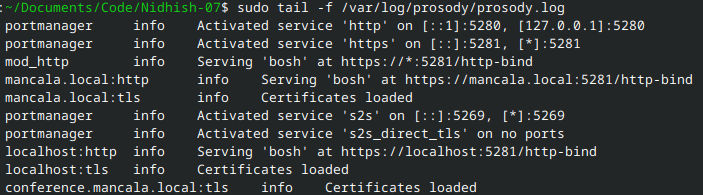
<p>If everything is configured correctly, the state will be “active.” You can verify this by checking the log file using: <code class="language-plaintext highlighter-rouge">sudo tail -f /var/log/prosody/prosody.log</code> we can check the log file. If configured successfully, the output will resemble this:</p>

<p><img src="https://ik.imagekit.io/9rzgc7hdk/log_file.webp?updatedAt=1737718749758" alt="" /></p>

<h2 id="adding-users-and-communicating-via-a-xmpp-client">Adding users and communicating via a XMPP client</h2>

<p>The plan is to allow users to either use their existing Jabber ID or create a new one through our server. For testing purposes, I manually added users to the server using the following command:</p>

<div class="language-javascript highlighter-rouge"><div class="highlight"><pre class="highlight"><code><span class="nx">sudo</span> <span class="nx">prosodyctl</span> <span class="nx">adduser</span> <span class="o">&lt;</span><span class="nx">username</span><span class="p">@</span><span class="nd">domain_name</span><span class="o">&gt;</span>
</code></pre></div></div>

<p>After executing the command, you will be prompted to set a password for the user.</p>

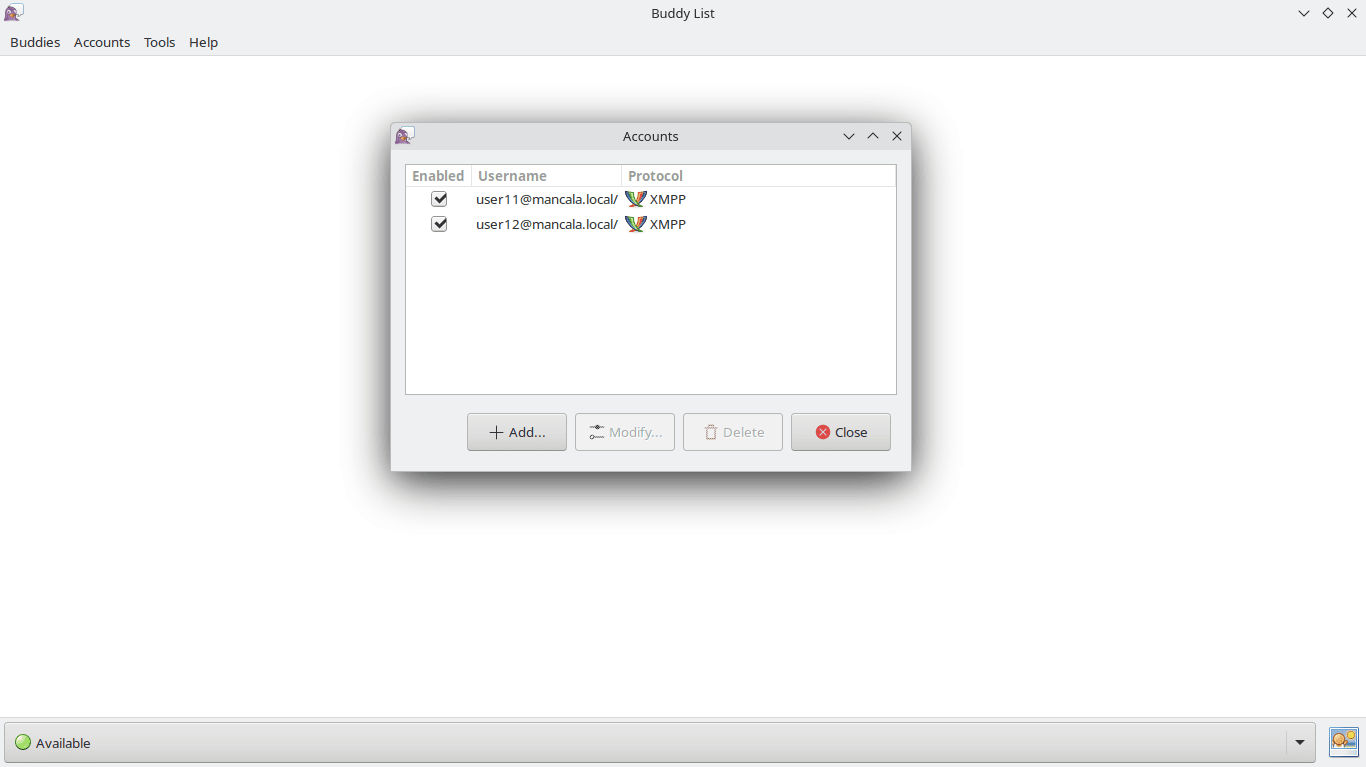
<p>For communication, I used the Pidgin client.</p>

<p><img src="https://ik.imagekit.io/9rzgc7hdk/pidgin_client.webp?updatedAt=1737719788117" alt="" /></p>

<p>As shown in the image above, I have added two users, <code class="language-plaintext highlighter-rouge">user11</code> and <code class="language-plaintext highlighter-rouge">user12</code>.</p>

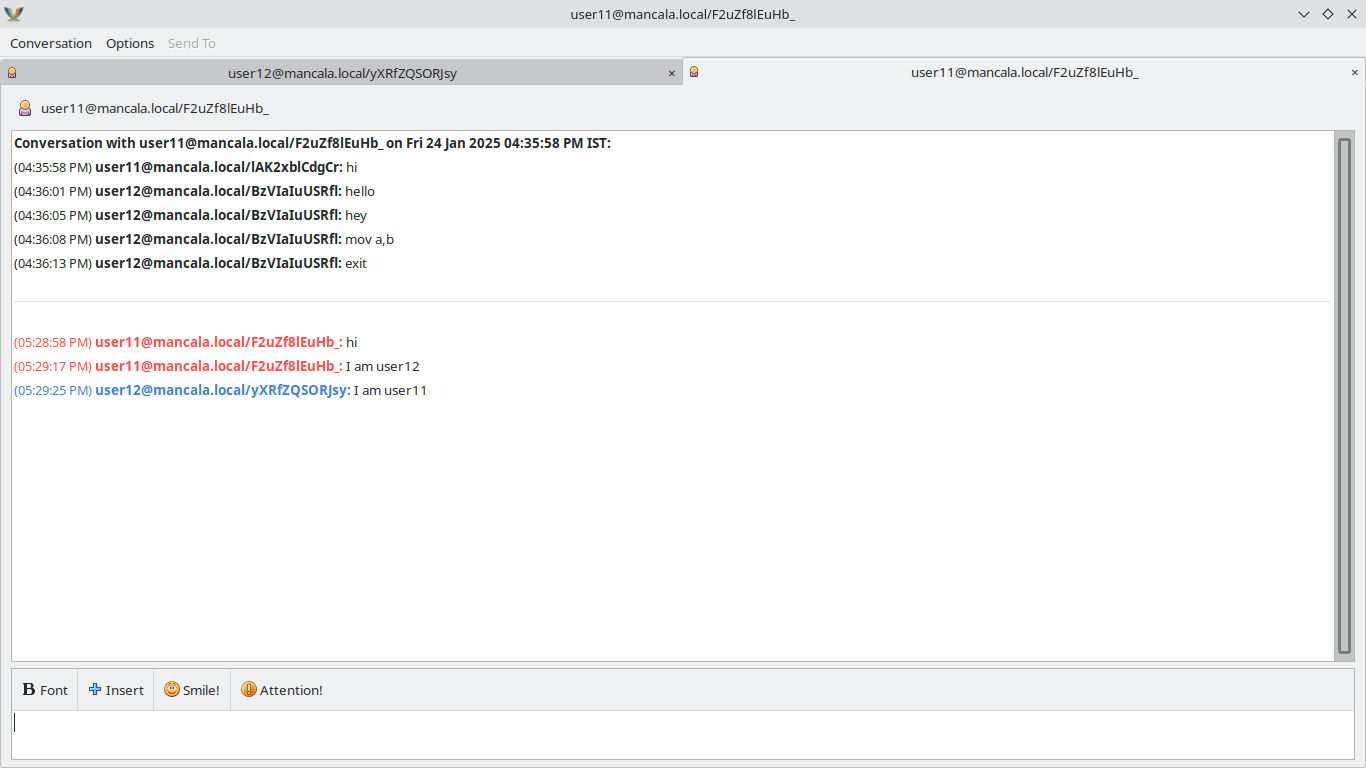
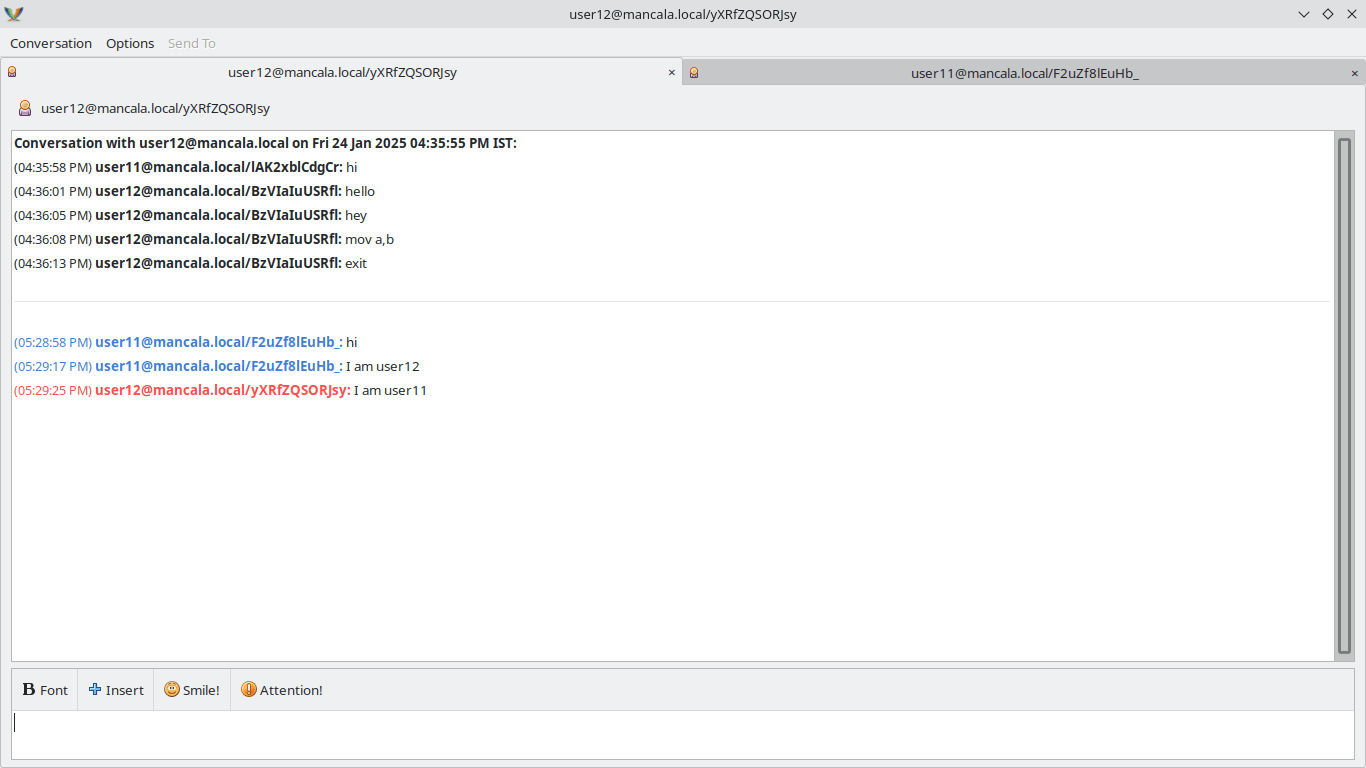
<p>To test communication, I sent a message from <code class="language-plaintext highlighter-rouge">user11</code> to <code class="language-plaintext highlighter-rouge">user12</code> by addressing it to <code class="language-plaintext highlighter-rouge">user12@mancala.local</code>. Below are the results:</p>

<p><img src="https://ik.imagekit.io/9rzgc7hdk/chat1.webp?updatedAt=1737720195676" alt="" />
<img src="https://ik.imagekit.io/9rzgc7hdk/chat2.webp?updatedAt=1737720043780" alt="" /></p>

<p>Since I used the Pidgin client on the same device, both user tabs appear in the interface. The screenshots confirm that I successfully established a user-to-user communication channel over LAN.</p>

<h2 id="whats-next">What’s next</h2>

<p>For the next week, I plan to:</p>

<ul>
  <li>Implement in-band registration.</li>
  <li>Enable communication over the internet.</li>
  <li>Develop the logic for the game invitation system.</li>
</ul>]]></content><author><name>Nidhish Chauhan</name><email>rch246chauhan@gmail.com</email></author><category term="KDE" /><category term="SOK" /><summary type="html"><![CDATA[Week 1 progress of SOK 2025.]]></summary></entry></feed>